
Managing a workforce manually is one of the biggest challenges for SMEs today, which is why choosing the right workforce management software for SMEs in India has become essential for business growth. You manage operations, handle customer service, and, at the same time, deal with employee attendance, shifts, and payroll. If you are still using Excel sheets or manual registers, you already know how confusing and time-consuming it can get.
Late salaries, attendance errors, and shift confusion are common problems. These issues not only waste time but also affect employee satisfaction and business growth.
What is Workforce Management Software for SMEs in India
Workforce management software helps businesses manage employee-related tasks, including attendance tracking, shift scheduling, and payroll processing.
Instead of managing everything manually, the software automates these processes and keeps all data in one place. This reduces errors and saves a lot of time. For example, instead of calling employees to confirm shifts or checking registers for attendance, everything is available in real time on your dashboard.
Why SMEs in India Need Workforce Management Software
Many small businesses think these tools are only for large companies, but that is no longer true. In fact, SMEs benefit the most because they usually have limited HR staff and resources.
Manual attendance and payroll calculations often lead to mistakes, and even a small error in salary can create trust issues with employees. When these processes are automated, calculations become accurate and consistent, which builds confidence among employees.
At the same time, businesses spend a significant amount of time every day marking attendance, creating shift schedules, and calculating salaries. When all these activities are automated, it frees up valuable time that can be used for more important business tasks.
Employee productivity also improves when there is clarity in work schedules, and salaries are processed on time. A structured system creates discipline and transparency, which leads to better performance across the team.
Compliance is another important factor for Indian businesses. Managing PF, ESI, and labor laws manually can be risky and time-consuming. A reliable workforce management system helps ensure compliance and reduces the chances of penalties.
Managing multiple shifts can be challenging, especially in industries that operate around the clock, which is why understanding how to manage shift workers in India becomes important.
Key Features of Workforce Management Software for SMEs in India
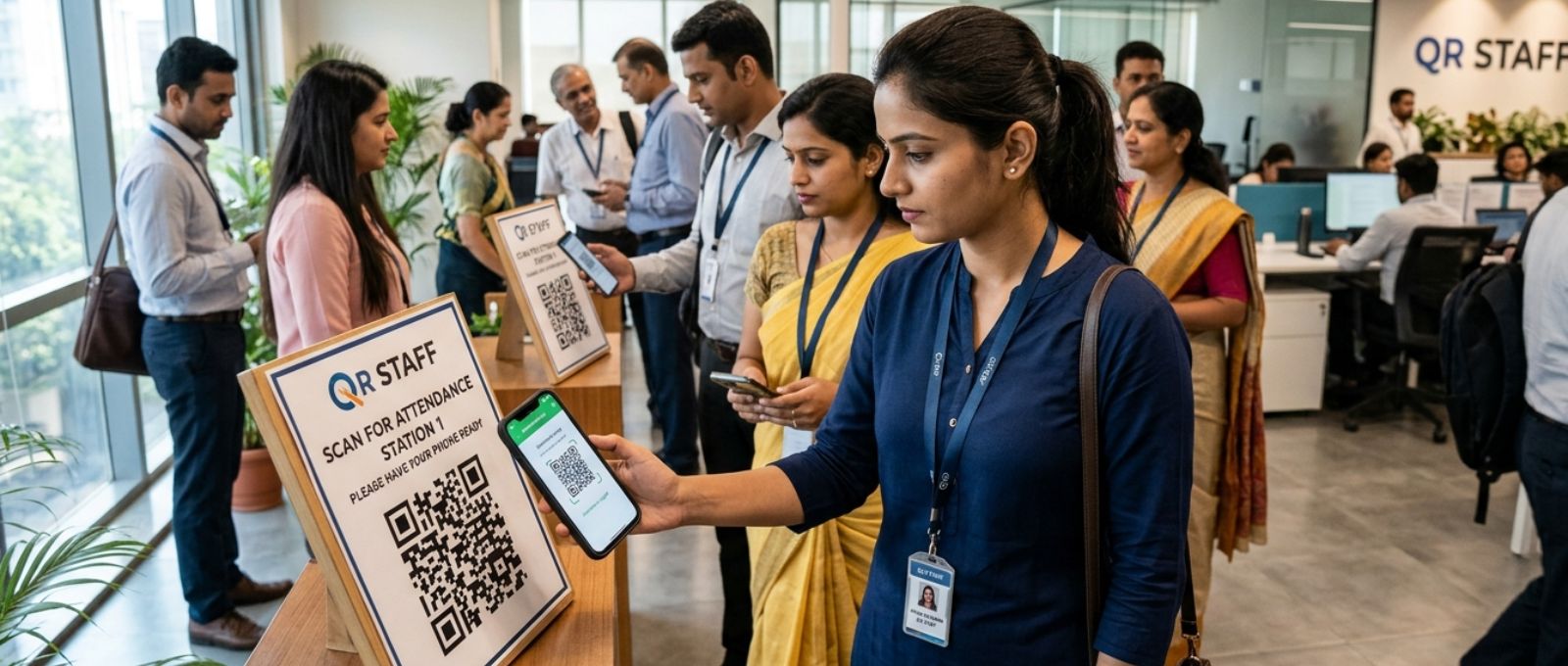
Not all workforce management tools are the same, so it is important to choose one that fits your business needs.
Attendance management should include real-time tracking, preferably with mobile or QR-based check-ins, so that accuracy is maintained and issues like buddy punching are avoided. Shift scheduling should be flexible and easy to manage, especially for businesses that operate in multiple shifts.
Payroll automation is another critical feature, as it ensures that salary calculations are based on attendance, leaves, and overtime without manual intervention. A mobile-friendly system is equally important because it allows both managers and employees to access information anytime and from anywhere.
Finally, reports and analytics play a key role in decision-making. A good system should provide clear insights into workforce performance so that businesses can take informed actions.
Top Workforce Management Software in India
There are many workforce management solutions available in the Indian market. Some of the most commonly used platforms include QR Staff, Zoho People, Keka, GreytHR, and Darwinbox. While these tools are widely recognized.
1. QR Staff
QR Staff is designed to make workforce management simple and stress-free for businesses of all sizes. Its user-friendly interface ensures that even non-technical teams can easily manage attendance, shifts, and payroll without any confusion. Real-time QR-based attendance tracking, it eliminates manual errors and brings complete accuracy to daily operations. The software automates routine HR tasks, helping businesses save time and focus on growth instead of administrative work. Built specifically for Indian SMEs, it supports local compliance and business needs while remaining affordable and quick to implement.
(Pros: Easy to use for beginners, real-time attendance tracking, saves time through automation, supports Indian compliance, cost-effective for SMEs. Cons: deep analytics for complex organizations.)
2. Zoho People
Zoho People is a well-known HR platform with a wide range of features, but many small business users often find it difficult to navigate in the beginning due to its detailed setup and multiple modules. For teams without technical support, it can take time to get comfortable.
(Pros: Strong integrations, scalable for growing companies, Cons: Complicated interface for beginners, requires time to learn and configure.)
3. Keka
Keka provides advanced payroll and HR automation, but its initial setup and workflow configuration can feel slightly complex, especially for businesses that are new to digital tools. Many users need time before they can use it efficiently.
(Pros: Powerful payroll features, automation-driven, Cons: Setup complexity, not instantly easy for non-technical teams.)
4. GreytHR
GreytHR is widely used for compliance and payroll management, although its interface can feel less intuitive for modern users. Businesses looking for a simple and quick setup may find it slightly difficult to adapt at first.
(Pros: Strong compliance support, reliable payroll system, Cons: Outdated user experience, limited ease of use for beginners.)
5. Darwinbox
Darwinbox is designed for large organizations and offers a comprehensive set of features, but its complexity can be overwhelming for SMEs. Smaller teams often find it difficult to implement and manage without dedicated HR or technical support.
(Pros: Feature-rich, highly scalable, Cons: Complex system, expensive, not suitable for small businesses.)
| Feature | QR Staff | Zoho People | Keka | GreytHR | Darwinbox |
| Ease of Use | Very simple and beginner-friendly | Complex for new users | Moderate learning curve | Not very intuitive | Highly complex |
| Setup Time | Quick setup, ready in minutes | Time-consuming setup | Requires configuration | Moderate setup | Long implementation |
| Pricing for SMEs | Affordable | Expensive for small teams | Higher pricing tiers | Moderate | Very expensive |
| Attendance Tracking | Real-time, QR-based | Available but complex setup | Available | Available | Advanced but complex |
| Shift Management | Simple and easy | Complicated workflows | Requires setup | Basic | Advanced but heavy |
| Payroll Automation | Easy and accurate | Available in higher plans | Strong feature | Strong feature | Advanced but complex |
| Best For | SMEs, startups | Mid to large businesses | Growing companies | Compliance-focused firms | Large enterprises |
How Workforce Management Software Improves ROI
Many business owners see software as an added expense, but in reality, it helps save money over time.
For example, if a business spends around three hours daily on HR tasks and the cost of that time is 500 per hour, it results in 1500 per day or approximately 45,000 per month. By automating these tasks and reducing the time spent by up to 70 percent, businesses can significantly cut down operational costs.
Apart from direct savings, there are other benefits such as fewer payroll mistakes, reduced employee disputes, and better utilization of the workforce. All these factors contribute to improved efficiency and profitability.
Real Life Situation
Consider a manufacturing unit that operates in three shifts. Without a proper system, employees may miss shifts, attendance records may be incomplete, and payroll processing can take several days.
With a solution like QR Staff, attendance is recorded instantly, shifts are clearly planned, and payroll is generated automatically. This creates a more organized and efficient working environment.
How to Choose the Right Software
Before selecting any workforce management software, it is important to evaluate your requirements carefully. You should consider whether the system is easy to use, whether it fits within your budget, and whether it supports Indian compliance standards.
It is also important to check if the software can handle your shift structure and whether it offers reliable customer support. Choosing the right solution ensures smooth implementation and long-term benefits.
Common Mistakes to Avoid
Many businesses make the mistake of choosing overly complex software that their team struggles to use. Ignoring mobile accessibility can also create challenges, especially for teams that need flexibility.
Another common issue is not evaluating customer support before making a decision. Additionally, selecting the cheapest option without considering features can lead to long-term problems.
Conclusion
Managing a workforce manually in today’s fast-moving business environment is no longer practical. SMEs in India need efficient and reliable solutions to stay competitive.
Workforce management software helps businesses save time, reduce errors, and improve productivity while providing better control over operations.
If you are looking for a simple and effective solution, QR Staff is worth exploring. It is designed to meet the real needs of growing businesses without adding unnecessary complexity.
FAQs
1. Which workforce management software is best for SMEs in India?
The best software depends on your business needs, but solutions like QR Staff are ideal for SMEs because they are affordable and easy to use.
2. Can workforce management software reduce payroll errors?
Yes, automation ensures that salary calculations are based on accurate attendance and leave data, which significantly reduces errors.
3. Is workforce management software expensive?e
Not necessarily. Many tools are designed specifically for small businesses and offer cost-effective pricing plans.
4. How does it improve employee productivity?
When employees have clear schedules and receive timely salaries, it creates a more structured and motivated work environment.
5. Is it suitable for small teams?
Yes, even small teams benefit from automation as it improves efficiency and reduces manual workload.
Leave a Reply